G00 vs G01: Simple CNC example
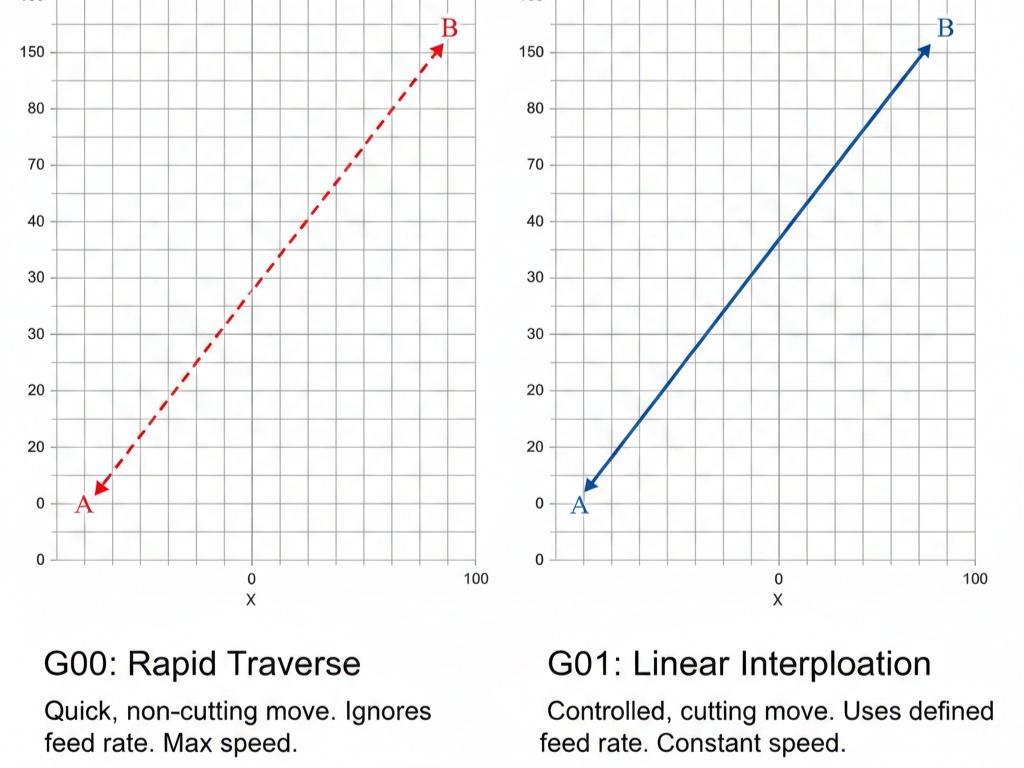
In CNC programming, G00 and G01 are the two most fundamental commands.1 They both move the tool to a specific coordinate, but the “how” and “why” behind those movements are completely different.
The Quick Comparison
| Feature | G00 (Rapid Positioning) | G01 (Linear Interpolation) |
| Purpose | To move the tool quickly through “air.” | To move the tool while cutting material. |
| Speed | Maximum machine speed (uncontrolled). | Controlled by a specific Feed Rate (F). |
| Path | Not always a straight line (can be a “dog-leg”). | Always a perfectly straight line. |
| Safety | High risk of crash if used inside material. | Safe for cutting and precise shaping. |
G00: Rapid Positioning
Think of G00 as “Travel Mode.” You use it when the tool is safe and clear of the workpiece. It tells the machine to move to the target as fast as its motors allow.2
Because the machine is trying to get there as fast as possible, it might move one axis faster than another.3 This can cause a “dog-leg” path rather than a straight diagonal, which could hit clamps or fixtures if you aren’t careful.
Read Also: Basic G-Codes Explained with Examples
G01: Linear Interpolation
Think of G01 as “Work Mode.” This command requires an F (Feed Rate) value (e.g., F500 for 500mm/min). The machine controller calculates the exact path to ensure the tool moves in a perfectly straight line at that constant speed.
Simple Code Example
Imagine you want to move from home to a block of aluminum, cut a 50mm line, and then retract safely.
G-Code
G90              ; Absolute positioning mode
G00 X0 Y0 Z10.0  ; RAPID to home, 10mm above the part (Safe height)
G00 X10.0 Y10.0  ; RAPID to starting position of the cut
G01 Z-2.0 F100.0 ; FEED down into the material (2mm deep) at 100mm/min
G01 X60.0 Y10.0  ; FEED 50mm across the X-axis to make the cut
G00 Z10.0        ; RAPID retract back to a safe height
Lines 2-3 (G00): The tool “jumps” into position. We don’t care how it gets there, just that it gets there fast.
Line 4 (G01): We slow down and enter the material. Without the F code, the machine would likely throw an error.
Line 5 (G01): The actual cutting happens here.
Line 6 (G00): Once the cut is done, we get the tool out of the way immediately.
Read Also: G & M Codes with Examples