What is T0101 in CNC programming?
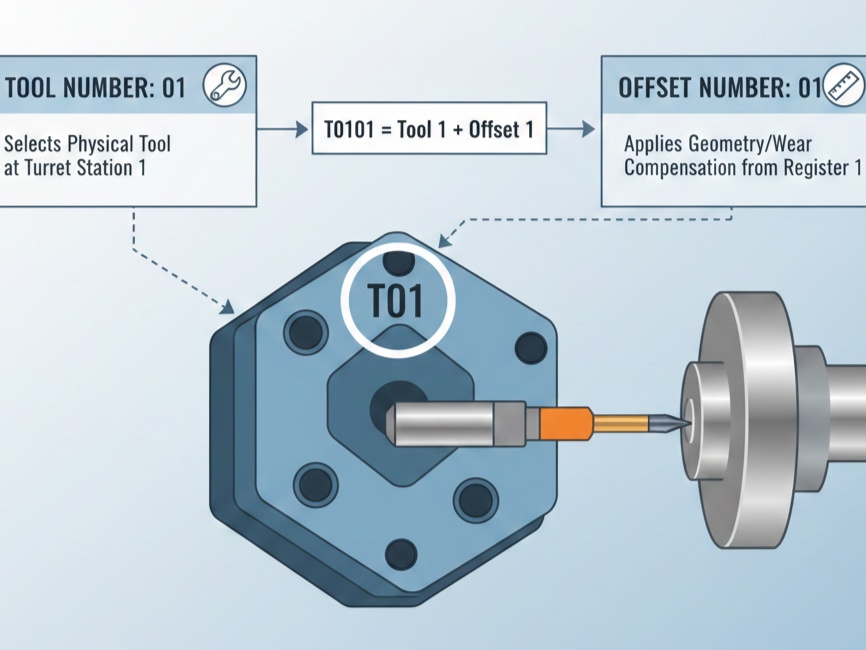
In CNC programming (specifically for lathes/turning centers), T0101 is a command used to select a specific tool and its associated offset. It is most commonly found in Fanuc, Haas, and similar control systems.
The code is typically split into two parts:
- T01 (First two digits): The Tool Number. This tells the machine to rotate the turret to station #1.
- 01 (Last two digits): The Offset Number. This tells the machine to look up the compensation values (length, wear, and geometry) stored in register #1 of the offset table.
Why are there four digits?
While it is common to see the numbers match (like T0101, T0202, or T0505), they don’t have to. The four-digit format gives programmers the flexibility to use different offsets for the same physical tool.
| Command | Action |
| T0101 | Uses Tool 1 with Offset 1 (Standard). |
| T0121 | Uses Tool 1 but applies Offset 21 (Useful for using the same tool for two different features with different tolerances). |
| T0100 | Selects Tool 1 but cancels all offsets (Often used for safe tool changes). |
What is an “Offset”?
The offset is critical because no two tools are exactly the same length or width when mounted.
- Geometry Offset: Corrects for the physical length of the tool in the X and Z axes so the machine knows exactly where the tool tip is.
- Wear Offset: Small adjustments made by the operator to account for the tool tip wearing down during a production run.
- Tool Nose Radius: Tells the machine the radius of the cutting tip for accurate curved or angled cuts.
Difference Between Lathes and Mills
- On a Lathe: You use the four-digit code (T0101). The offset is usually activated the moment the command is read.
- On a Mill: You usually use T01 followed by M06 to change the tool, and then a separate H01 or D01 command to activate the length or diameter offset.